AI writes, AI draws
Posts and images,
made by AI every day.
Hand over your company profile and materials once, and AI prepares the copy and images on your posting schedule. All you do is approve.

 Log inStart free
AI writes, AI draws
Hand over your company profile and materials once, and AI prepares the copy and images on your posting schedule. All you do is approve.

Sound familiar?
With SNS TOWN
Share your company profile and materials once, and posts and images are prepared on your posting cycle. You just read and press publish.
Post text from your profile and assets, on your posting cycle.
Picked from your library, or made fresh to fit the post.
Approved posts go out to each network at the set time.
Replies answered in your company's voice.Professional Enterprise

Supported networks
Connect as many accounts as you like to a company and switch in the header. Each account gets its own posting cycle and calendar.

A composer per network
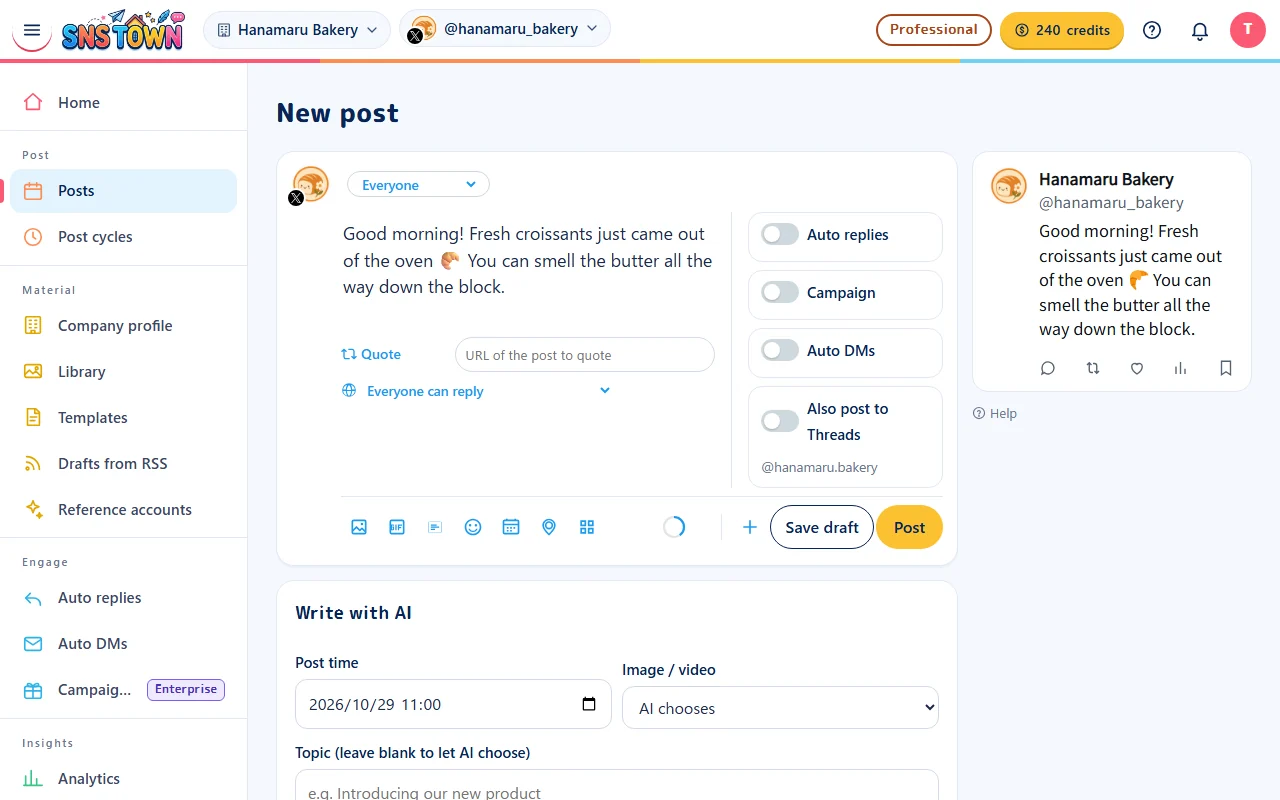
Pick a network in the header and the composer fields and preview change to match. Features a network lacks never appear, so there is nothing to second-guess.
A look inside
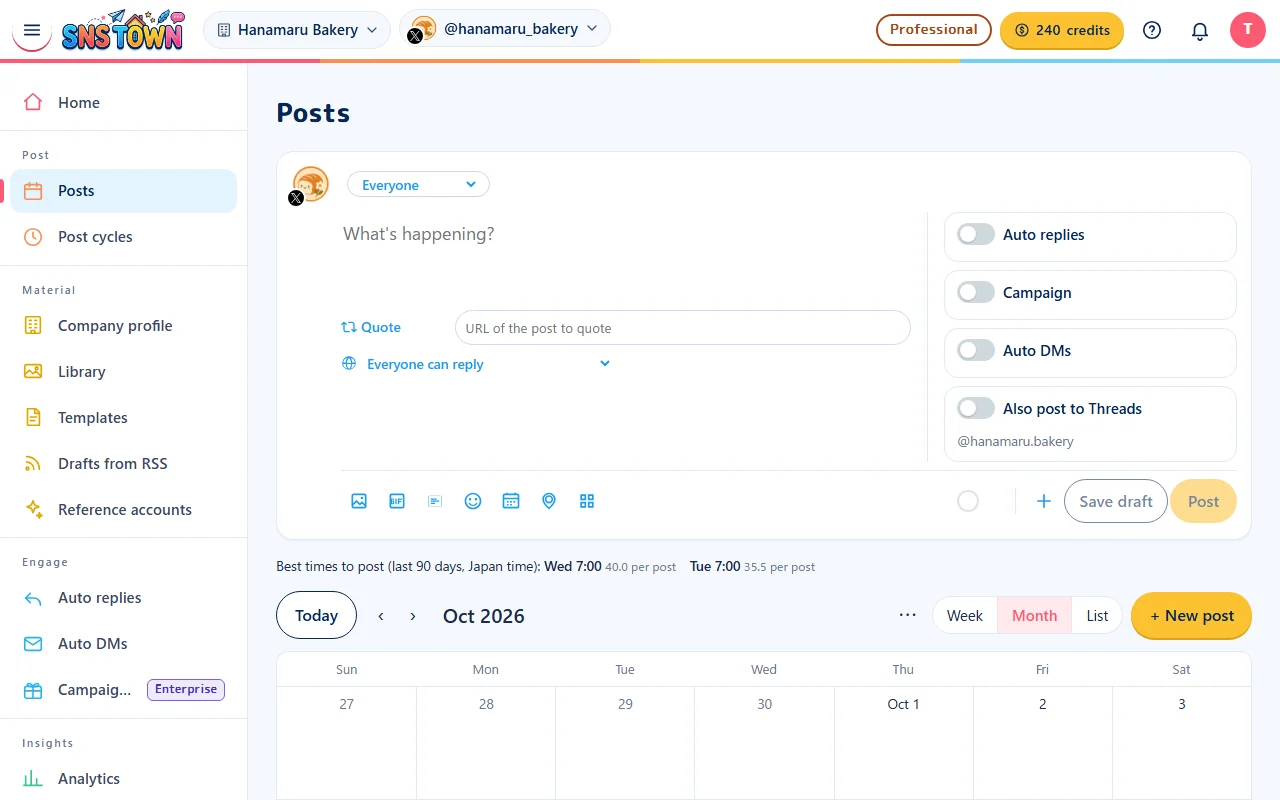
Features
Writes posts on your posting cycle from your company profile, key messages and library documents. It sticks to the facts you give it and never invents numbers or achievements.
Attaches a matching image or video from your library, or creates a new image to fit the post.
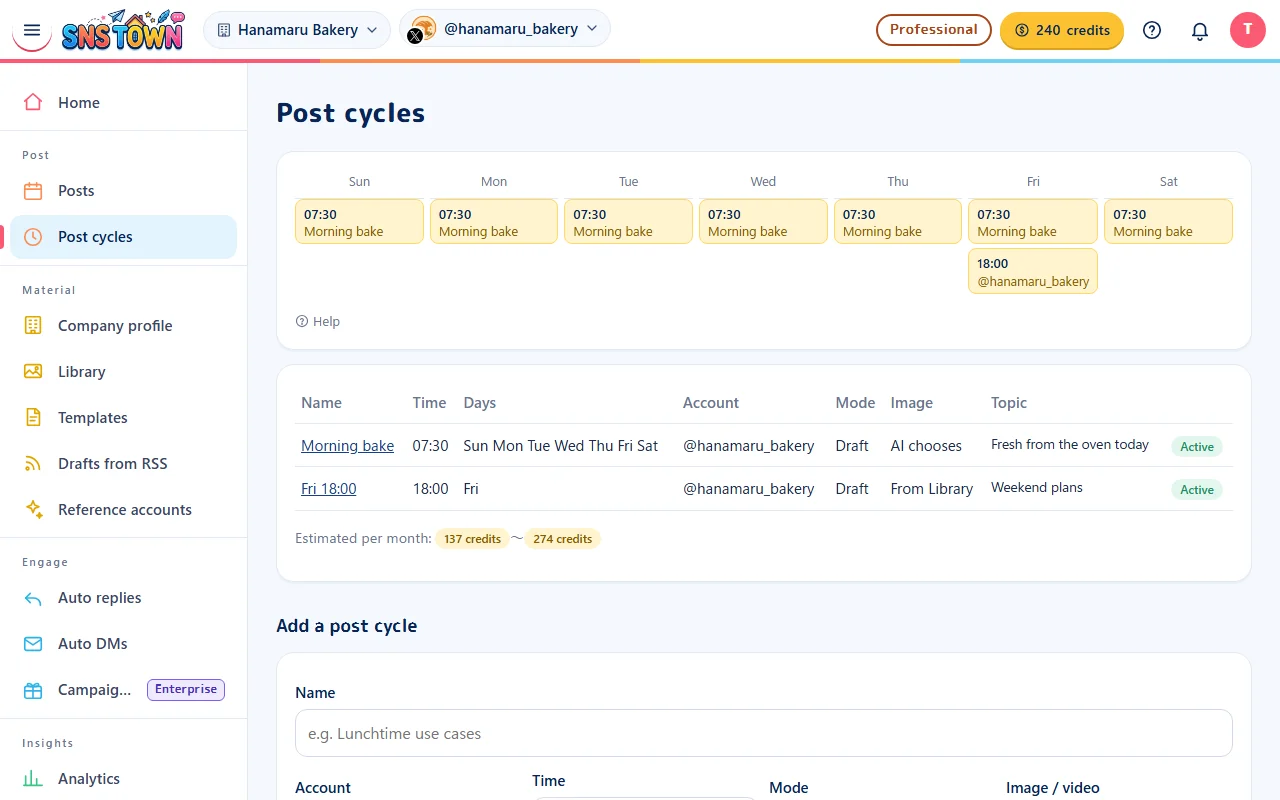
As many weekday-and-time slots as you need. Set the account, theme, image handling and mode for each.
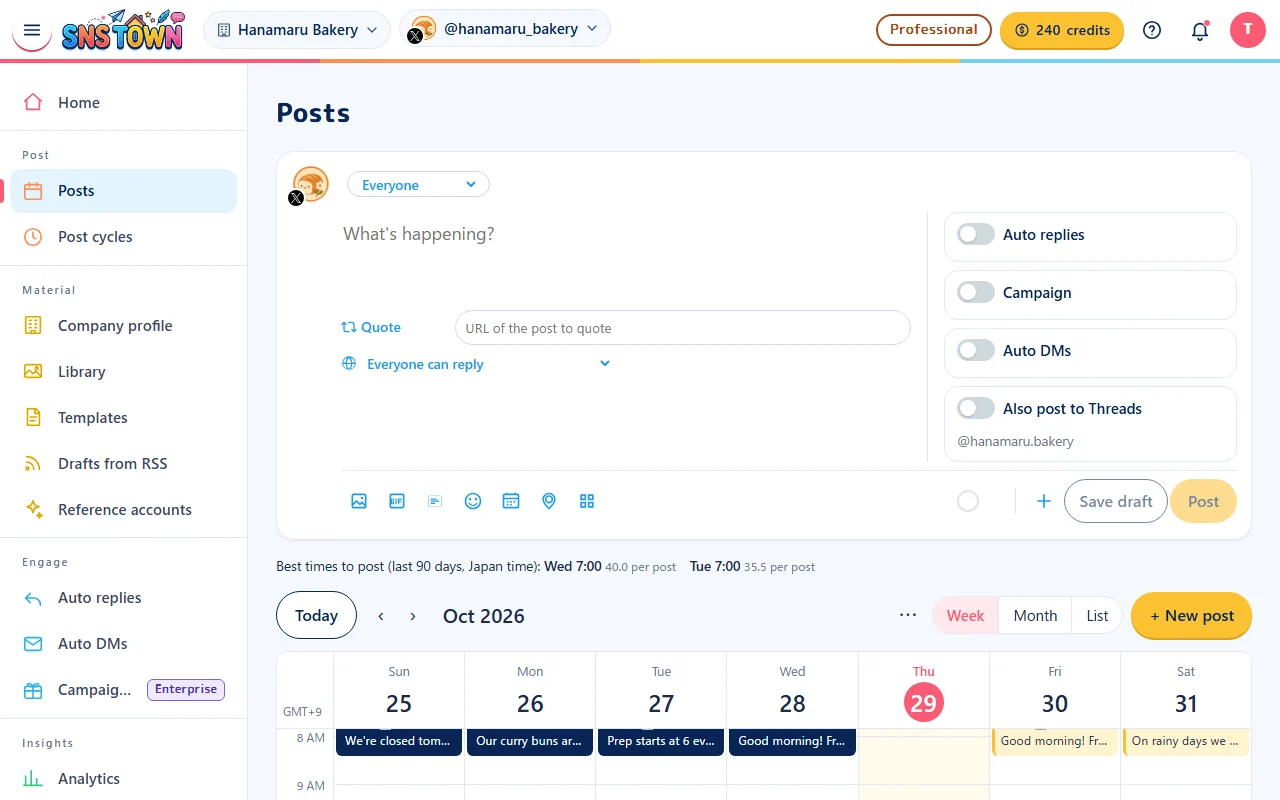
Google Calendar style. Colour-coded scheduled, draft and published posts, a current-time line, and create straight from an empty slot.
Fields change to match what X, Threads, Instagram, Facebook Pages and LinkedIn each support. With a live preview.
Draft mode publishes only what you approve. Auto mode publishes anything that passes the checks at the set time.
Enter your company website’s URL and AI reads the published information and writes your company profile. Connect a Google Drive folder and its images, videos and PDFs flow into the Library every hour.
Stops posts before they go out for URLs, @mentions, too many hashtags, asking for engagement, thread-style writing, being too similar to recent posts, and posting again within 1 hour.
Any number of accounts across networks under one company. Switch in the header, with a posting cycle per account.
Share reviewing, approving and sending back, with a record of who approved what.
Impressions, engagement and follower changes for each post, to shape your next posting cycle.
Answers incoming replies in your company's voice to keep conversations going. Can be set to check before replying.
How it works
About 15 minutes from sign-up to your first draft.

Just an email address and company name. Open the link in the confirmation email and you are done.

Press "Allow" on each network's own screen. We never hold your passwords, and you can disconnect at any time.

Your business, products, audience, tone and things never to say. Documents and photos go into the library.

Weekdays, times, themes, image handling and mode. As many a day as you like.

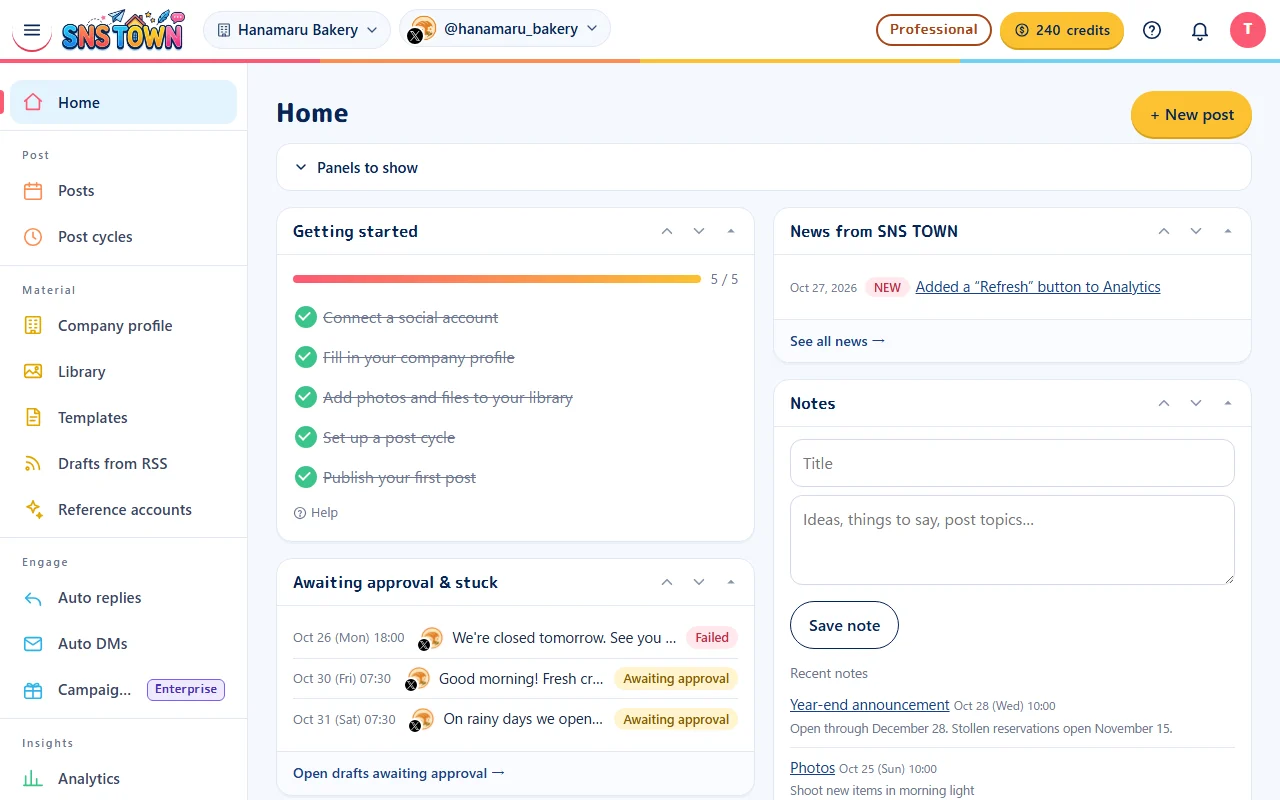
Read the drafts that arrive by 15:00 two days ahead and press publish. In auto mode they go out on their own.
The life of a post
Posting-cycle slots are created five days ahead, written by the AI in one batch, and waiting for approval by 15:00 two days before.
The posting cycle creates a row for the publish date and time.
Your profile, assets and recent posts are sent so the AI writes the text and image brief.
Drafts that pass the checks wait for approval, with images already attached.
In draft mode a person decides. Auto mode skips this and schedules it.
Published on the scheduled run. Credits for failed posts are refunded.
We check the post is live and use it to judge near-duplicates in the next drafts.
Why you can trust it
Accounts connect through each network's own consent screen (OAuth 2.0), and you can revoke access there at any time. Tokens are stored encrypted.
Posting, replies, DMs and connecting accounts go through the official APIs (OAuth) published by X, Meta (Threads, Instagram, Facebook) and LinkedIn. We never hold your password and never automate screens.
Nothing beyond your profile and assets. No invented numbers, achievements or testimonials.
Drafts that fail a check are fixed, not posted. If they cannot be fixed, they wait for approval.
The whole site runs on Cloudflare with always-on HTTPS (TLS 1.2+, HSTS), WAF and DDoS protection, login rate limiting, bot protection (Bot Fight Mode, Turnstile) and DNSSEC.
Every plan is free for 7 days. Failed AI generations are refunded, and we never charge you automatically for going over a limit.
Pricing
Scheduling and posting come with your plan allowance; AI drafts and images use the credits included every month. Every plan is free for 7 days.

Cafés, salons, classes and more
| One X post a day (written and scheduled yourself) | |
| AI drafts twice a week | |
| Credits used per month | 26 credits |
Fits within your monthly 50 credits (26 credits a month for this usage).

Small businesses, builders, professional firms
| One X post a day (AI draft + image) | |
| One Instagram post a day (AI draft + library photo) | |
| Reading back reactions (analytics) | |
| Credits used per month | 300 credits |
Fits within your monthly 400 credits (300 credits a month for this usage). Analytics and reference accounts included.

Multi-location shops, multi-brand teams, agencies
| One post a day on 3 accounts (AI drafts; 2 AI images + 1 library image) | |
| 3 auto replies a day | |
| Credits used per month | 780 credits |
Fits within your monthly 1,200 credits (780 credits a month for this usage).Auto-replies and auto-DMs included.
FAQ
No. Press "Allow" on each network's screen to connect. SNS TOWN never holds your passwords, and you can revoke access from each network's settings at any time.
In draft mode, only posts you approve go out. Only slots set to auto mode publish posts that pass the checks at the set time. You choose the mode per slot.
They are waiting for approval by 15:00 two days before the publish date, and you can open them from the calendar or home.
If your library has a matching image or video, it is attached. Otherwise a new image is made to fit the post (image generation uses credits). Using library assets costs no image credits.
There are 4 monthly plans (Personal $10/mo, Team $65/mo, Professional $200/mo, Enterprise $525/mo, tax included). Scheduling, posting, and importing are available within your plan's limits, while AI drafts (3 credits) and image creation (4 credits) are paid for with the credits you receive each month. Every plan comes with a 7-day free trial. Pay annually in one lump sum and get 1 months off.
They last 180 days from the day they are added. The oldest are used first, and you can see what expires soon under "Plan & credits".
Every time a company that signed up through your referral link pays, you get 30% of the payment back in credits, for as long as they stay.
X, Threads, Instagram (business or creator accounts), Facebook Pages and LinkedIn (personal profiles). The composer changes its fields to match the network chosen in the header. YouTube Shorts and TikTok are being added.
Instagram needs at least one image or video. Two or more become a carousel, and a single video becomes a Reel. Published posts cannot be deleted from SNS TOWN, so delete them in the Instagram app.
Posting, replies, DMs and connecting accounts go through each network's official API (OAuth 2.0) only, and we never hold passwords. Tokens are stored encrypted. The site runs on Cloudflare with always-on HTTPS, WAF, DDoS protection, login rate limiting, bot protection (Bot Fight Mode, Turnstile) and DNSSEC.
Start today
Sign-up takes a minute. Connect your accounts, add your company profile, and see your first draft today.